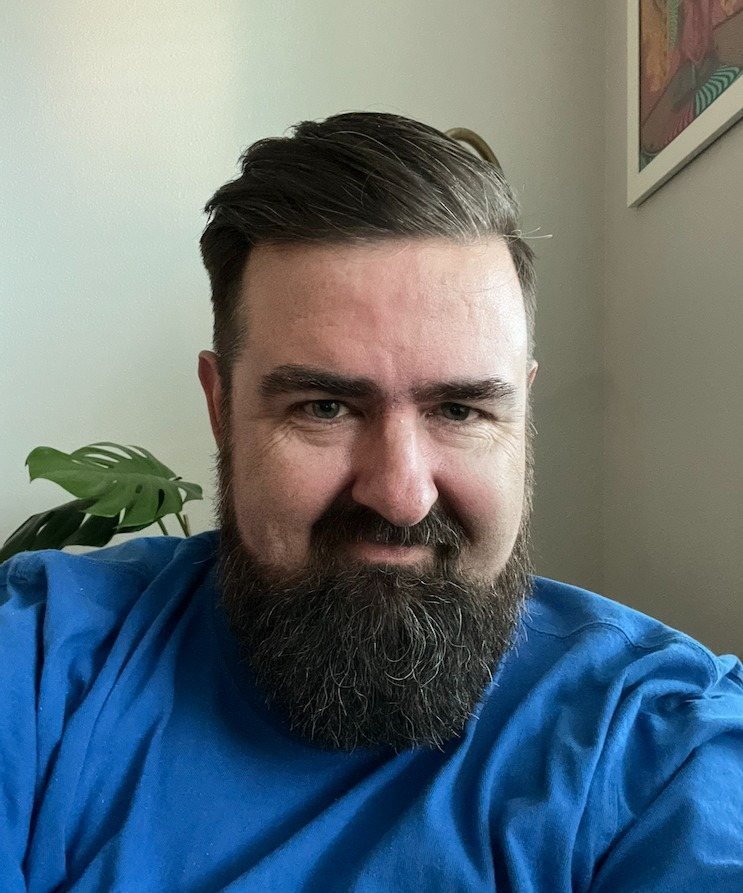
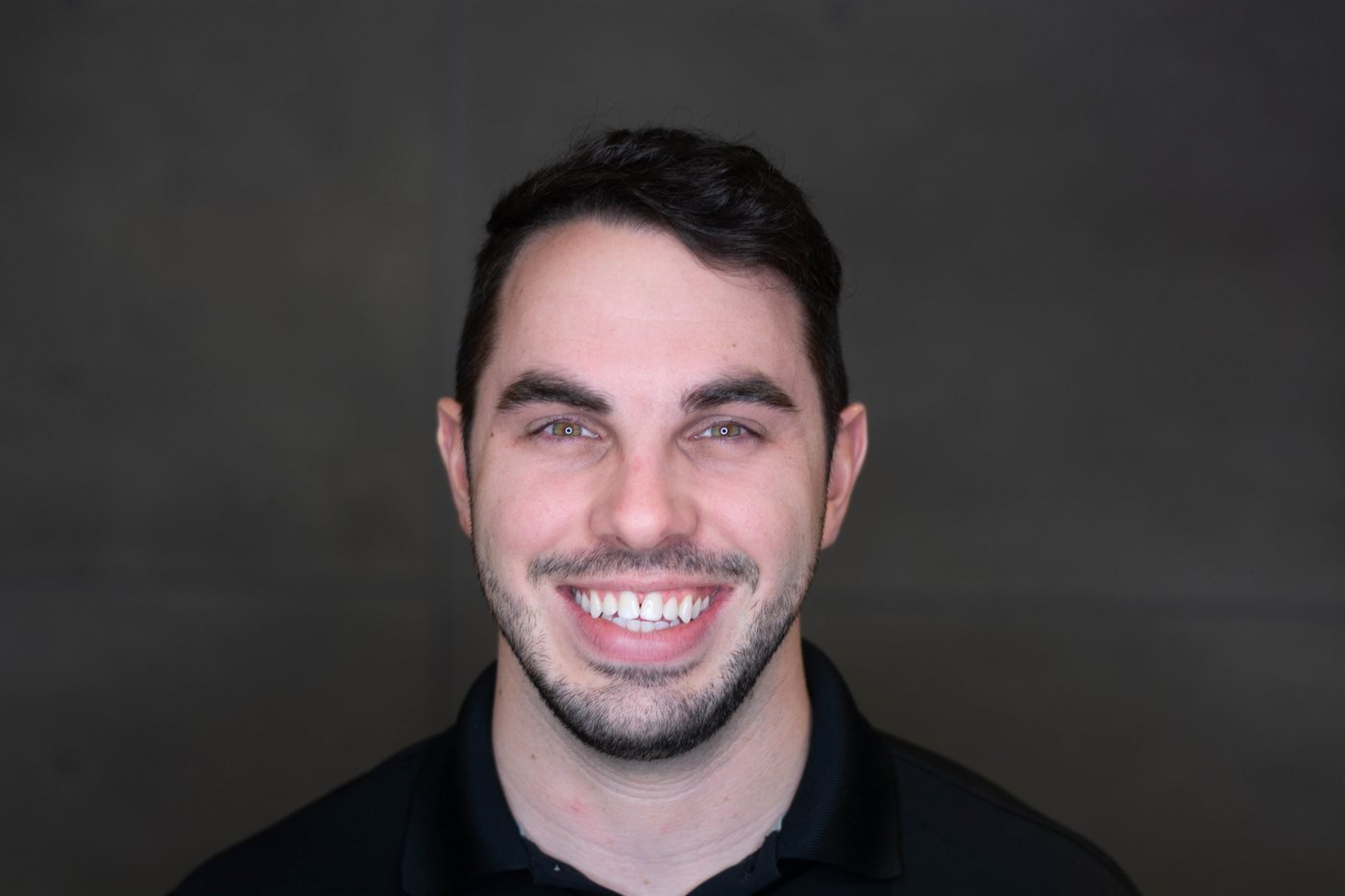
Greg Goforth grew up in Bakersfield, California, learned QBasic from a math tutor, and went on to build trucking software in PHP as a first job. Goforth has built software for more than 25 years, including as CTO of Bitwise Industries, and builds Watchflows from Fresno, California on nights and weekends alongside a day job in ed tech.
Watchflows is a native Mac automation app: triggers, conditions, actions and AI on a visual canvas, or described in plain English, running locally with no account. It costs 49 dollars once after a 14-day trial, is also on Setapp, and has more than 800 users across Setapp and the direct download, according to Goforth. It is bootstrapped, with no investors.
Key takeaways
- Goforth builds Watchflows alone as the whole org chart, answering the support email and building the engine, with AI agents writing the code under Goforth's direction.
- Nothing ships until the full test suite is green and a second AI reviews what the first one wrote, which Goforth says has produced 104 releases and about 13,700 automated tests so far.
- Watchflows is local-first with no account: flows, runs and history sit in a local database and keys in the macOS keychain, so there is no 'trust us with your data'.
- The AI choice is the user's: ten providers, from on-device Apple Intelligence, Ollama and LM Studio to a Claude or ChatGPT subscription or hosted Watchflows AI, picked per node.
- The Setapp launch passed 600 downloads in its first two weeks, and Goforth wants Watchflows to become a common app on the Mac with a reputation alongside makers like MacPaw.
Before any of this
Startup.talk:Where did you grow up, and what was childhood like?
Goforth:Grew up in Bakersfield, CA. Loved video games and computing. First computer was a Hewlett Packard. Built choose-your-own-adventure games in QBasic. Rollerblades and Oakley Razor Blades ruled.
Startup.talk:What first got you into programming?
Goforth:A math tutor. She would teach us stuff like Chess and introduced me to QBasic. I was hooked ever since.
Startup.talk:What was your first job in software, and what did it teach you?
Goforth:I knew how to write spaghetti PHP code so I went to a local technical training school to see if they offered courses in PHP that would solidify my foundations and give me a piece of paper that said I knew how to do it. They didn't, but a local employer had been there the day before asking if there was anyone at the school that wrote PHP. I was referred over and got that job writing trucking software in PHP.
Twenty five years of building
Startup.talk:You have built software for more than 25 years. What stands out from that stretch?
Goforth:The development of our systems, the rise of AI being something that I don't think I saw getting as good as it did as fast as it did, and now that we're here, being able to apply my 25 years of development and pattern recognition to the systems required to keep AI development of a large application maintainable.
Startup.talk:What made you leave the day-to-day of building for others to ship your own Mac app?
Goforth:I didn't leave it, it's just now way more possible to do on the side. Watchflows and my other side projects are all done on nights and weekends while my day job is in ed tech.
Startup.talk:Are you building Watchflows alone, and what do you outsource?
Goforth:Yes, alone. One person is the org chart: I build the engine and I answer the support email. No investors. What I hand off is the typing. AI agents write the code under my direction, and the process is stricter because of it: nothing ships until the full test suite is green, new behavior always gets tests, a second AI reviews what the first one wrote, and every fixed bug gets a gate so it can't come back. Releases are built, signed and notarized by an automated pipeline. 104 releases and about 13,700 automated tests so far.
The product
Startup.talk:What chore on your own Mac made you decide to build Watchflows?
Goforth:I wanted my Mac to stop making me do the same things over and over, and nothing could see the whole picture on one canvas. So I built it.
Startup.talk:Why the name Watchflows?
Goforth:Because I'm simple, and the app literally "watches" for something to happen, then runs the "flow".
Startup.talk:Why a visual canvas of triggers, conditions and actions rather than scripts?
Goforth:Because a chore is rarely a straight line. It has a decision in the middle, or two things that should happen at once. On a canvas you can see the whole thing: what starts it, where it branches, what runs side by side. A script hides that from everyone except the person who wrote it, and a single column of steps makes branching hard to read. To note, we do have a script node, so your custom scripts are still usable here, but it's just one node in the graph.
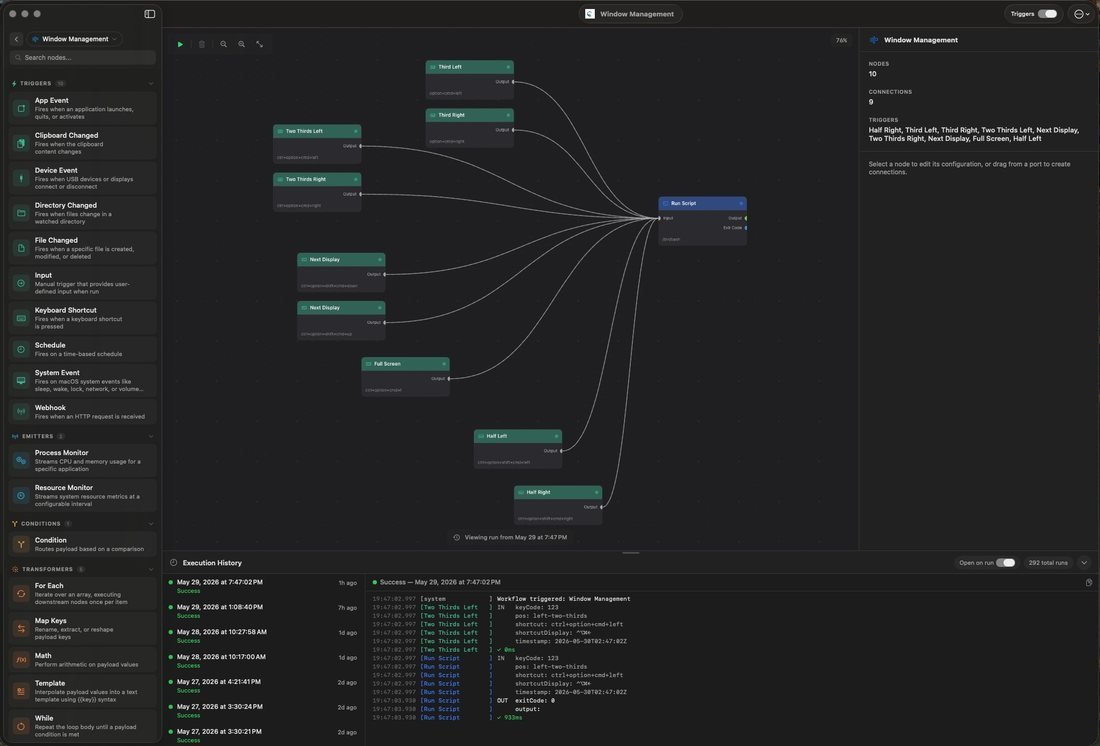
The canvas is also where you see what happened. Every node gets a row in the run history with its status, how long it took and the data in and out, and you can replay a past run on the input it captured. And when AI builds the flow for you, it lands on the same canvas, so you can read what it made and change any of it by hand.
Startup.talk:How does the Flow Builder turn plain English into a working flow?
Goforth:You describe the chore in plain words and the nodes appear on the canvas, wired up, with each one explained. Keep chatting and it edits what is there instead of starting over.
The part I care about is that the model never touches your canvas directly. It gets a summary of the flow with secrets masked, plus the real catalog of node types. It sends back a plan, and that plan is checked step by step against the real node system. An unknown node or an illegal connection fails the build, and the exact problem goes back to the model for up to two repair rounds. Only a valid plan gets drawn, and a build that never validates leaves your canvas exactly as it was.
A fresh flow arrives switched off, with a checklist of anything that needs you, like a field it could not guess or a destructive node to confirm. It asks instead of guessing, and it can read a failed run and tell you why it failed.
Startup.talk:Why support Apple's on-device model, Ollama, your own keys and hosted Watchflows AI?
Goforth:Because the AI choice should be yours, not mine. Some people want nothing to leave the Mac, so Apple Intelligence, Ollama and LM Studio run fully on-device. Some already pay for Claude or ChatGPT and should not pay twice, so those subscriptions work. Some have API keys for OpenAI, Anthropic, Gemini or OpenRouter. And some have none of that and just want it to work, which is what hosted Watchflows AI is for, with 2,000 free Sparks to try it.
That is ten providers, and you can pick a different one per node. If you bring your own model I do no AI billing at all. The provider bills you.
Startup.talk:Why local-first with no account?
Goforth:The work happens on your Mac because that is where your stuff lives. Flows, runs and history sit in a local database. Keys sit in the macOS keychain. Nothing is uploaded, so there is no "trust us with your data" and no SOC 2 page to read. Apps like Watchflows ask for a lot of access, and users should be able to trust that, with that kind of access, they are getting something that isn't mining them for data.
No account for the same reason: download, open, build. The 14-day trial needs no signup and no card. When you buy, a licence key arrives by email and it is verified on your Mac, so it works offline.
“Nothing is uploaded, so there is no "trust us with your data" and no SOC 2 page to read.”Greg Goforth
Startup.talk:How do webhooks reach a Mac without port forwarding?
Goforth:Through a small relay I run. A Public Webhook trigger gives a flow its own HTTPS address, so GitHub, Stripe or anything else on the internet can start it. No port forwarding, no tunnel, no server of your own.
The sender posts to that address, the relay queues the delivery, pushes it to your Mac if it is connected, and deletes it the moment your Mac confirms. That is the whole job. It forwards the bytes as they came and does not parse or log them. The queue is encrypted, and anything your Mac never collects is refused after 24 hours.
Signature checks run on your Mac with a secret the relay never has, and the relay never answers on your flow's behalf. You can regenerate or revoke a channel at any time.
Startup.talk:Why a one-time 49 dollar price rather than a subscription, and why also Setapp?
Goforth:One price, own it. 49 dollars once, every v1 update included, and the 14-day trial is the whole app. The flows run on your Mac, not on my servers, and I think people are tired of renting software. The parts that do cost money to run, like hosted AI, are optional and we offer full app access plus AI credits as part of our Watchflows Subscription (no one-time payment necessary).
Setapp is for people who would rather have one membership for all their Mac apps. It is the same app from the same codebase, and there your membership is the licence. It also helps us get the word out about Watchflows to users that are already engaged with those types of apps.
Startup.talk:How do you handle AI that decides mid-flow, and how do you stop it doing something wrong?
Goforth:Two parts: make the AI's answer something the flow can check, and put hard limits around anything that acts.
An AI node can be given an output schema, and its answer is validated against it and retried if it does not fit, so the next node gets real structured data. For decisions there are Yes or No, Choose and Score nodes that come back with a probability, so you can route on confidence: sure enough goes ahead, not sure goes somewhere safer. AI nodes have a Failure outlet, so an error is a branch and not a dead flow. A flow can also stop and ask a person, which leaves the final call with you.
The Agent node, which runs a tool loop, starts with every tool off. It runs inside iteration and token budgets, and you can scope its file access to one folder. That scope is enforced in code, not by asking the model nicely, and running shell scripts is withheld while it is scoped. On top of that, any node that can destroy something is flagged in red, and arming a flow that has one asks you every time.
Positioning
Startup.talk:Who is Watchflows for, and what job does it do for them? Describe the user who gets the most value.
Goforth:People whose work lives in files and apps on their Mac and who are doing the same thing by hand every day. It is what you reach for when the chore has more than one step, a decision in the middle, or a file on your Mac. Usually that is someone who has outgrown Shortcuts or Hazel, or is tired of a Zapier bill for things that never needed the cloud.
The ones who get the most out of it are developers, photographers, video creators and people running local AI: lots of files, repeatable chores, and a reason to keep the data on their own machine. They do not have to script. They describe it, or drag nodes, and then it keeps running with the window closed.
Startup.talk:How do you view your positioning relative to Apple Shortcuts, Keyboard Maestro and Hazel? Is there another competitor you think of first?
Goforth:They are all good at what they do, and I am not neutral. Shortcuts is free and built in, but it is one column of steps, its AI is Apple Intelligence only, and a failed run leaves nothing behind to look at. Hazel is great at folders, and folders are all it watches. Keyboard Maestro is powerful, and it is a list of macros.
Watchflows is the one where a visual canvas with branches, AI from any provider, triggers for folders, the clipboard, apps, hotkeys, schedules and webhooks, and files that never leave your Mac are all in the same app, and it builds the flow from a sentence.
The one outside that list is Zapier. It has the canvas and the AI, but it lives in the cloud and bills monthly, and plenty of people are paying that bill for chores that could run on their own Mac.
Startup.talk:What is your core moat that prevents Apple from replicating your feature set in Shortcuts?
Goforth:It is the combination, and the pace. Shortcuts uses Apple Intelligence only. Watchflows works with ten providers, including the Claude or ChatGPT subscription you already pay for and models running on your own Mac. It keeps a history of every run with the data in and out of each node, and can replay one. It takes webhooks from the internet. It runs branches side by side. And it is one person shipping constantly: 104 releases so far, with support answered by the person who builds the engine.
Startup.talk:What are some of the use cases for Watchflows that are not obvious and can add a lot of value to users? List as many as possible.
Goforth:Name screenshots after what is in them and file them by month.
Sort the Downloads folder as files arrive, and sweep the backlog with a preview and an undo.
Summarize PDFs overnight.
A morning brief.
Clipboard history on a hotkey.
Your own command palette: your commands pinned above your apps.
An app launcher in place of Raycast.
Log an expense from a hotkey.
Plug in your monitor or dock and have the Mac set itself up for work.
GitHub or Stripe webhooks that start a flow on your Mac.
A notification when Claude Code finishes a long task.
An AI study buddy.
Small games for your kids, built as flows.
An AI agent that finds a bug in a repo, fixes it and opens a pull request, scoped to one folder.
Let AI agents run your flows through the built-in MCP server.
Work with Linear from a flow.
One flow calling another, so you build a piece once and reuse it.
Startup.talk:What is the one detail in Watchflows you are proudest of?
Goforth:That it's a solid, reliable and powerful way to make your Mac work in new and exciting ways. There are lots of agents you can choose from now, but Watchflows works differently, doesn't chain you to any specific AI vendor, and allows deep integrations with many different APIs and apps on your Mac.
Launch
Startup.talk:What did you learn from launching on Product Hunt?
Goforth:Not to overthink it. If you don't have much base it's a fairly quiet event anyways. I didn't have a huge base and kept putting it off, and now I wish I'd done it earlier.
Startup.talk:Which feedback from the launch surprised you?
Goforth:Honestly I'm just grateful to see ANY feedback. The app seems to be well liked from initial comments on Setapp, and early Reddit posts were helpful in building up our Discord server.
Startup.talk:What did the launch do for trials and paid licenses?
Goforth:Launch on Product Hunt yielded a lot of downloads that are now in free trials. The Setapp launch has gotten over 600 downloads in its first two weeks and climbing. Beyond direct sales, this is a great way to develop some MRR.
The hard part
Startup.talk:How many people use Watchflows today?
Goforth:800+ across Setapp and the direct download.
Startup.talk:What is a challenging time you had building this company?
Goforth:Ensuring that the app would scale as its feature set grew. I've gone to great lengths over the last year of development (this isn't an overnight vibed app) to ensure that it feels good to use and that, for all of its configuration options, the flow builder negates the learning curve and lets people just say what they want and have the flow appear before them, ready to run. It took a lot of tweaking to get that right and I'm pretty happy with the current ux.
Startup.talk:Who believed in you before there was anything to show? What did they say or do?
Goforth:My wife, kids, and family and friends have been cheering me on from the beginning.
Startup.talk:What is the hardest part of building automation that people trust with their files?
Goforth:A mistake with a file is not like a mistake in a web form. You cannot always take it back. So the hard part is making the dangerous things impossible to do by accident without getting in the way of the person who means it.
Removing a file goes to the Trash by default, and permanent delete is an opt-in. The file nodes refuse a folder unless you turn that on, and they never accept your home folder, Desktop, Downloads or Documents themselves as the thing to move or delete. Any node that can destroy something is marked in red, and arming a flow that has one asks you every time. There is no "don't ask again". A flow you downloaded gets inspected before it opens. Running a flow over a folder of existing files shows you every change first, makes only the ones you leave checked, and can be undone. And a flow the AI built arrives switched off.
“A mistake with a file is not like a mistake in a web form.”Greg Goforth
What it is all for
Startup.talk:What would make you say Watchflows has succeeded?
Goforth:When I started building it I thought it would be cool if Watchflows could generate enough for a car payment a month. It's now just about there. That feels like genuine success for a builder. The positive customer comments are helpful too :)
Startup.talk:If anyone can describe an automation in a sentence, what happens to the people who used to build them?
Goforth:I think in this AI bubble era everyone is focused on feeling like they are no longer relevant. AI is just a new abstraction, same as modern code is on top of assembly. I look at this as a shift in what we do and how we do it, but not a replacement for. Why wouldn't the people that used to build automations by hand use tools to be able to do it faster?
“AI is just a new abstraction, same as modern code is on top of assembly.”Greg Goforth
The road ahead
Startup.talk:What are your milestones for the next 12 to 18 months, in users and revenue?
Goforth:Continue to refine and polish the app, listen to customer feedback and drive the app in the direction that makes the most sense for the most people. I'm in this for the long haul, and determined to make Watchflows a common app on mac.
Startup.talk:And where do you want Watchflows to be in five years?
Goforth:A common name amongst mac app enthusiasts and a reputation up there with other makers like MacPaw.
This interview was conducted in writing and has been edited lightly for length and clarity.
About Watchflows
Watchflows is a native Mac automation app built by Greg Goforth in Fresno, California, with a visual canvas, AI from any provider and local-first, no-account operation.
| Attribute | Verified Detail |
|---|---|
| Company | Watchflows |
| Founder(s) | Greg Goforth |
| Country | USA |
| From | Bakersfield, California |
| Based in | Fresno, California |
| First job | Trucking software in PHP |
| Background | 25+ years building software; former CTO, Bitwise Industries |
| Funding | Bootstrapped, no investors |
More founder interviews
 ScaScan
 VoCalm
 Lensiq
 digiQueue
For founders
Building something? Want to share your journey?
Tell us how it started, what nearly broke it and where it is headed. We will turn it into a story like this one.
Share your journeyFor readers
Want to read more human stories behind the startups?
New founder interviews and stories, as they are published.
Follow us on LinkedIn