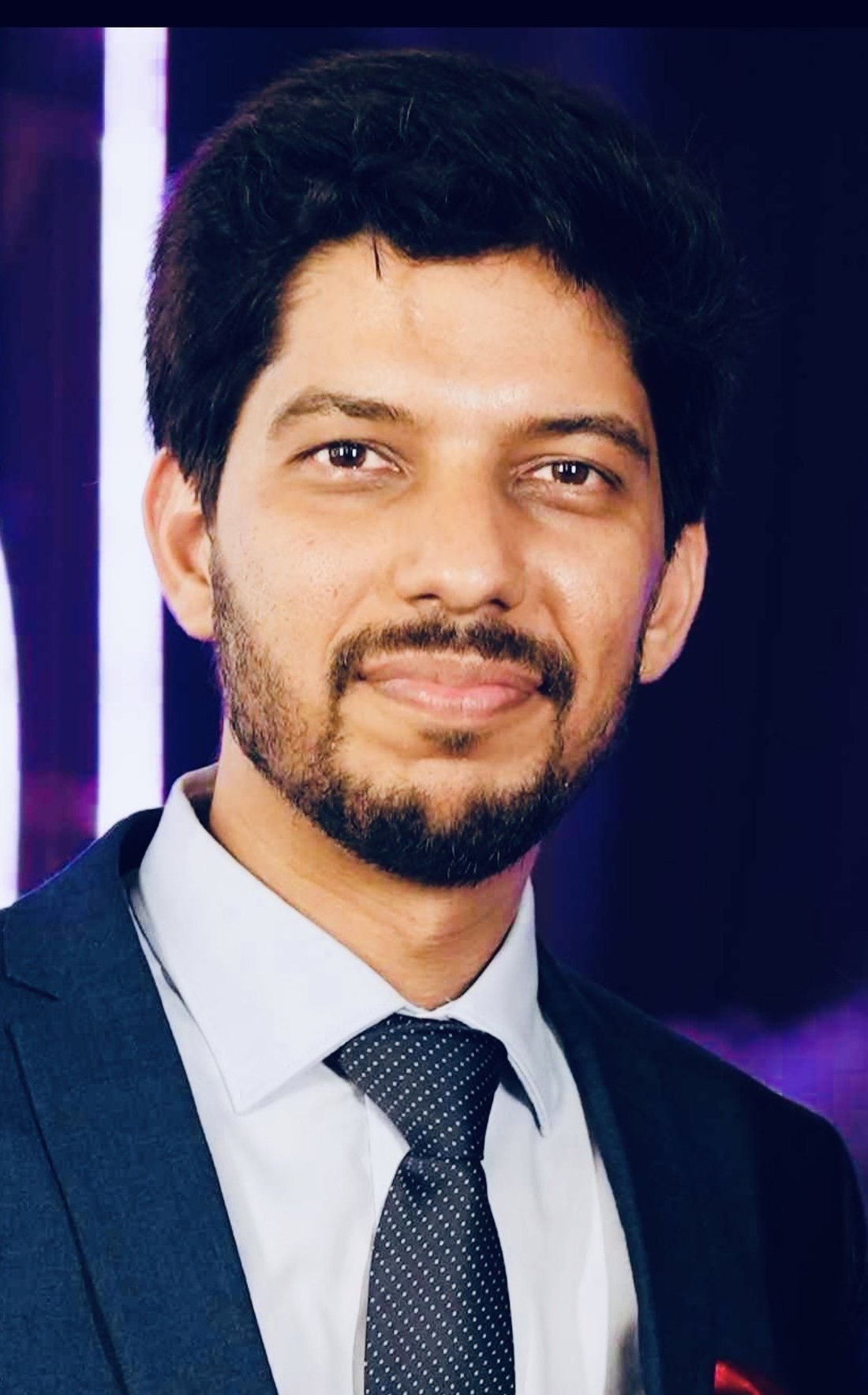
Rishab Sharma grew up in Ludhiana playing cricket and chess, trained as a software engineer, and co-founded an online rental business before building SnapMonk. The product started as a fix for his own problem: after shipping two Android apps he was paying for separate screenshot and ASO tools, and losing days in Figma making App Store screenshots that still looked amateur.
SnapMonk is an AI app screenshot generator and ASO toolkit for the App Store and Google Play, with store-ready captions, device frames, localization in 12+ languages, a keyword report and a daily rank tracker. Sharma says makers have generated more than 20,000 screenshots on it, and that about 340 developers have signed up so far.
Key takeaways
- Sharma built SnapMonk because the growth loop for a small app was split across tools: one for screenshots, another for keywords and ranks, with nothing connecting them.
- His view is that the first screenshot is the pitch: most people see a small thumbnail in search and decide in a second or two, so a short benefit headline matters more than raw app screens.
- He charges for AI generation but keeps the manual editor and exports free, because every AI render costs real money and he would rather say so than hide limits or add a watermark.
- In his Count My Tap case study, acquisitions rose 72.78% after a redesign with localized screenshots, which he describes as a before-and-after on one app, not a controlled experiment.
- The AI designs around a developer's real screens and never redraws the interface or invents features, partly because both stores reject misleading screenshots.
Before any of this
Startup.talk:Where did you grow up, and what was childhood like?
Sharma:I grew up in Ludhiana. Childhood was mostly cricket and chess. Even as a teenager I wanted to build something of my own. I had no idea what a business really was at that age, I just knew I wanted to make things. Back then I imagined building something physical, like a bicycle. I never guessed it would be software.
Startup.talk:What first got you into building things?
Sharma:I have always liked starting things and trying new ideas. A few years ago I co-founded a business in the online rental space. But my background is software engineering, and I kept wanting to build a real product that solves a hard problem. AI changed the math for me. A small team can now ship a good product much faster than before, and that made it the right time to go all in.
Startup.talk:What was your first job, and what did it teach you?
Sharma:My first job was as a software engineer. It gave me my foundation. It taught me to think like an engineer: break a problem down, find the real cause, and build things that still work at scale. I use that every day at SnapMonk.
The road to SnapMonk
Startup.talk:What made you start SnapMonk?
Sharma:I built two Android apps, and to get them any traction I ended up paying for several tools. One for screenshots, because screenshots are the first thing a person sees when deciding whether to install. Another for ASO, to find the right keywords and see how the app ranked for each keyword in each country. That was two or three subscriptions for one small app. So I thought, why is this not one product? SnapMonk is that product: screenshots and ASO in a single subscription, for both the App Store and Google Play. It is for every app developer who hit the same wall I did.
“screenshots and ASO in a single subscription, for both the App Store and Google Play”Rishab Sharma
Startup.talk:What happened at your own app launches that convinced you screenshots needed a better tool?
Sharma:The tools I used were manual editors, and I am a developer, not a designer. My Photoshop skills are honestly not great. I would finish the app and then lose days making screenshots that still looked amateur, and then redo them for every size the stores ask for. SnapMonk does that part with AI. It designs the set, exports it in the exact dimensions each store accepts so there is no cropping or resizing, and localizes it. The ASO tools sit right next to it.
Startup.talk:How did SnapMonk grow from a tool you built for yourself into a product that strangers asked for?
Sharma:I built it for myself first. Drop in a raw screenshot, get a polished store-ready image. Then developer friends saw it and asked to use it. Then people I had never met started asking. That was the signal that this was not just my problem. Since then, most of what we ship comes straight from what users write to us. I still read every support email myself.
Startup.talk:Why did you decide that core screenshot generation and exports should stay free?
Sharma:An indie developer should be able to ship a decent listing without paying anyone. So the manual editor and exports are free, with no watermark and every store size included. The AI generation is paid, because every AI render costs us real money, and we would rather charge honestly for it than hide limits or stamp a watermark on your work. You can try the AI for $0.99 for three days before choosing a plan.
The product
Startup.talk:Why the name SnapMonk?
Sharma:"Snap" is for the screenshot, and for how fast it should be. "Monk" is for focus. A monk does one thing with full attention and no clutter. That is how I want the product to feel: calm, simple, and done in a few minutes.
Startup.talk:What makes an App Store screenshot earn the install, and what do most indie developers get wrong?
Sharma:The first screenshot is your pitch. Most people see it as a small thumbnail in search and decide in a second or two. The most common mistake is uploading raw app screens with no headline, so the first frame never says what the app does or why anyone should care. What works is simple: a short benefit headline of four or five words, text you can read at thumbnail size, and your strongest material in the first three frames. The other common misses are skipping localization and designing at a small size and scaling up, which blurs the text.
Startup.talk:How does SnapMonk use AI to choose layouts, write captions and translate them into 12 languages?
Sharma:You give it your app screens and a short description. The AI works out what the app is for, picks a visual direction and layout, and writes a short caption for each frame. You can edit anything it produces. For localization it does more than swap words. It rewrites the captions for each language and re-flows the text so the design still fits, including longer languages and right-to-left ones. I will keep the details of how it works under the hood to ourselves, but the goal is easy to state: you bring the app, it does the mechanical design work.
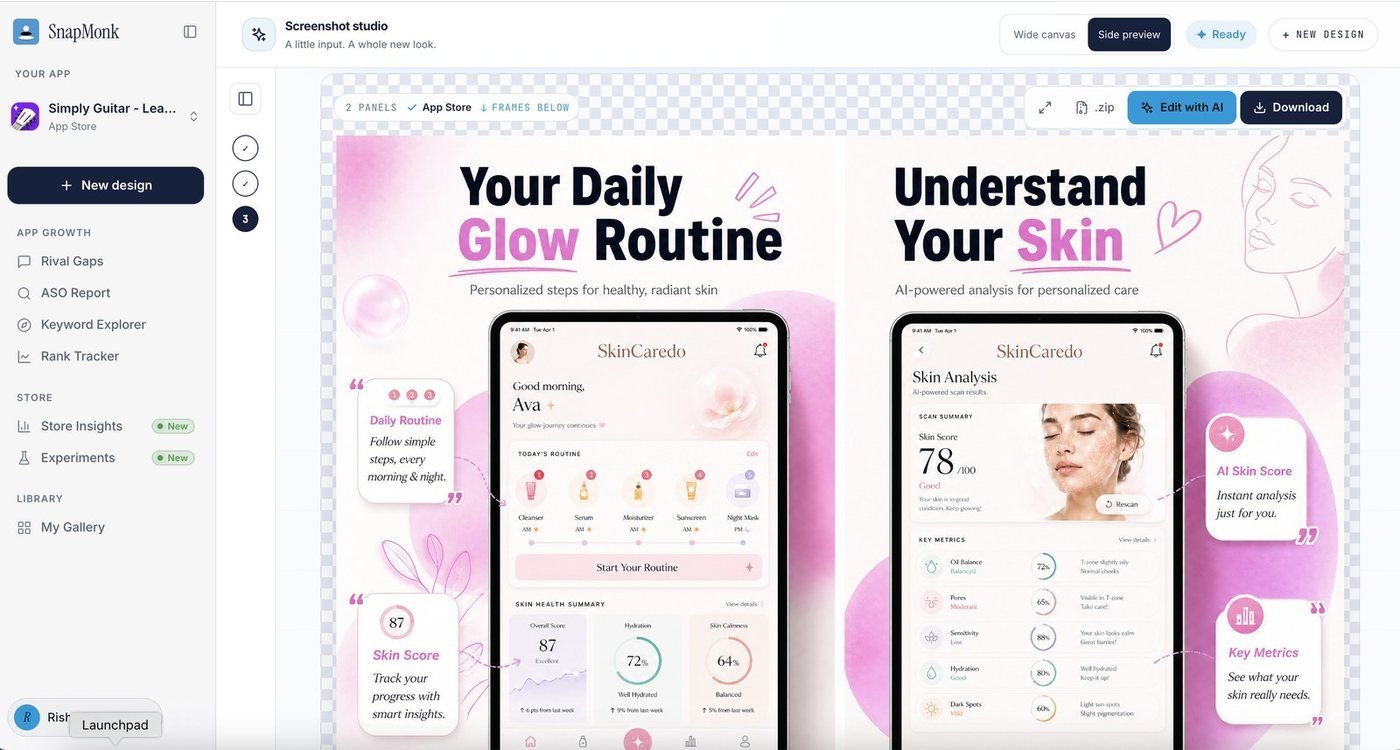
Startup.talk:Why did you add an ASO keyword report and rank tracker next to the screenshot studio?
Sharma:Installs from search are traffic multiplied by conversion. Keywords bring people to your listing, and screenshots decide whether they install. Fixing one without the other wastes the effort. As a developer I was paying for these as separate tools, and they never talked to each other. In SnapMonk the keywords you rank for and the screenshots that convert on them live in the same place, under one subscription.
Startup.talk:What did you learn from the Count My Tap case study, where installs from Google Play search rose after a redesign?
Sharma:Count My Tap is a simple tap counter on Google Play. Its screenshots were raw app captures with no headline. We rebuilt the set with a clear headline on the first frame and added German, Spanish and Chinese versions. In the next period, acquisitions were up 72.78%, and installs from Play search and explore were up 73.2%, per Google Play Console. I want to be clear about what this is: a before-and-after on one app, not a controlled experiment. But the lesson holds. For a small utility app the first screenshot is the whole pitch, and fixing it was the cheapest growth lever available.
Startup.talk:What do you deliberately leave out of SnapMonk?
Sharma:Anything that turns it into a general design tool. We are not trying to be Figma or Canva with a blank canvas and a thousand options. We also leave out the enterprise side of ASO: the huge market-intelligence dashboards that a solo developer pays for and never opens. And we do not invent your app. The AI designs around your real screens. It does not make up features or fake UI.
Positioning
Startup.talk:Who is SnapMonk for, and what job does it do for them? Describe the person who gets the most value.
Sharma:The person who gets the most value is an indie developer or a small team with an app that is finished but has no designer and no ASO person. They are shipping to one or both stores, often in several countries. The job is: get my listing to look professional and get found in search, this week, without hiring anyone or learning three tools.
Startup.talk:How do you view your positioning relative to AppLaunchpad, Previewed, Screenshots Pro, AppTweak, Sensor Tower and a freelance designer in Figma? Is there another competitor you think of first?
Sharma:I see three groups. Template and mockup tools like AppLaunchpad, Previewed and Screenshots Pro are good editors, but you still do the design thinking yourself. AppTweak and Sensor Tower are strong ASO platforms built and priced for large teams. A freelance designer gives great results but costs a lot per launch and is slow to update for every new language or test. SnapMonk sits in the gap: AI does the design work, the ASO tools are sized for indies, and it is one subscription. The competitor I actually think of first is none of these. It is the developer doing it by hand in Figma or Canva at midnight before launch.
“the developer doing it by hand in Figma or Canva at midnight before launch”Rishab Sharma
Startup.talk:What is your core moat in app store screenshots and ASO?
Sharma:Our moat is that the whole growth loop lives in one product. Most tools do one piece. A screenshot tool makes your images but has no idea what you rank for. An ASO tool shows your keywords but cannot fix the listing that people land on. SnapMonk does both, and they work together.
On the creative side, the AI screenshot studio designs the set, writes the captions, localizes it, and exports every size both stores accept.
On the ASO side we have several tools:
- ASO Report: enter your app and see the keywords it ranks for, with live ranks and where the opportunity is.
- Keyword Explorer: look up any keyword and see its popularity, its competition, and which apps hold the top spots.
- Rank Tracker: daily ranks for your keywords, country by country, so you can see whether a change worked.
So the loop is: find a keyword you can win, build screenshots that convert for it, then track the rank and see if it moved. Then repeat. Doing that with separate tools means three subscriptions and a lot of copy and paste. With us it is one login and one price, sized for indie developers rather than enterprise teams.
The second part of the moat is focus. We only do app store listings, so every store size and rule is built in and kept current. And we are small, we talk to users directly, and we ship what they ask for fast.
Startup.talk:What are some of the use cases for SnapMonk that are not obvious and can add a lot of value to users? List as many as possible.
Sharma:1. Checking if a change actually worked. After you update your screenshots or keywords, the Rank Tracker shows your rank every day. So you know if it helped, instead of guessing.
2. Choosing your next country. You can track the same keyword in many countries. If you already rank okay somewhere without even trying, that is the market to localize for next.
3. Catching a rank drop early. If your rank falls after an update or a competitor's launch, you see it that week, not a month later when installs are already down.
4. Naming your app before you build it. With Keyword Explorer you can check how popular a keyword is and how hard the competition is. So your name and subtitle carry a term you can actually win.
5. Validating an app idea. If a keyword has real demand and the top apps for it are weak, that is a gap worth building for.
6. Studying a competitor. Run the ASO Report on a rival app and see which keywords bring them installs. Then decide which ones you want to go after.
7. Turning competitor reviews into your roadmap. Rival Gaps reads what users complain about in other apps. That tells you what to build next.
8. Turning those same complaints into captions. If users of a rival app hate ads, then "No ads, ever" should be on your first screenshot.
9. A/B testing your first screenshot. Make three or four versions in minutes and test them in the store's own experiments.
10. Testing a new market cheaply. Localize only the screenshots and listing first. Translate the app itself only if installs follow.
11. One design for both stores. Build once and export for the App Store and Google Play, instead of doing the work twice.
Startup.talk:What is the one detail in SnapMonk you are proudest of?
Sharma:Localization that re-flows the design. Translating a caption is easy. Making a German headline that is twice as long still look right on the image, or flipping a layout for Arabic, is the tedious part that stops most developers from localizing at all. We made it one step.
Launch
Startup.talk:What did you learn from your public launch?
Sharma:Product Hunt gives you one good day and a lot of feedback from other founders. It is a spike, not a growth channel. The lasting value was the feedback and the credibility, not the traffic. What keeps paying is search, which is why we invest so much in it.
Startup.talk:Which feedback from the launch surprised you?
Sharma:How many people asked for ASO help rather than more design features. I assumed screenshots were the whole problem. Users told me being found was just as hard, and that pushed the keyword tools up the roadmap.
The hard part
Startup.talk:How many people use SnapMonk today?
Sharma:About 340 developers have signed up so far and use our product. Paying users are obviously less but the number is decent. It tells me that the people who try SnapMonk are getting real value from it. Our problem right now is not the product, it is that not enough developers know it exists yet. That is what the next year is about.
Startup.talk:What is a challenging time you had building SnapMonk?
Sharma:Deciding to charge for AI generation. Early on it was free, and usage grew faster than we could afford. Moving it behind a paid trial meant risking the goodwill of early users. It was the right call.
Startup.talk:Who believed in you before there was anything to show? What did they say or do?
Sharma:My first paying user I would say. It was a surreal experience to see them use SnapMonk-generated screenshots in their app store listing and get conversions
Startup.talk:How do you make sure AI-generated screenshots and captions still represent the real app honestly?
Sharma:The screens in the screenshots are your real app screens. The AI designs around them: background, layout, device frame, caption. It does not redraw your interface or invent features. Both stores reject misleading screenshots, so honesty here is not just a principle, it protects our users from rejection.
What it is all for
Startup.talk:What would make you say SnapMonk has succeeded?
Sharma:When an indie developer with no designer and no marketing budget can ship a listing that stands next to a big studio's, and gets real installs from it. The number I care about is not our sign-ups. It is how many of our users can show their own before and after.
Startup.talk:As app stores add AI-driven search and recommendations, how will screenshots and ASO change?
Sharma:I think keyword matching matters less over time and clarity matters more. If an AI is deciding which app to recommend, it has to understand what your app actually does, from your metadata, your reviews and probably the screenshots themselves. So a listing that says plainly what the app is for wins with both the algorithm and the human. Stores are also moving toward different listing pages for different searches, which means more versions of your screenshots, not fewer. That is hard to do by hand and easy with a tool like ours.
“a listing that says plainly what the app is for wins with both the algorithm and the human”Rishab Sharma
The road ahead
Startup.talk:What are your milestones for the next 12 months, in users and revenue?
Sharma:Three things. First, grow from a few hundred sign-ups to around 3,000, mostly through search and content, because that is where app developers look for help. Second, keep the paid conversion at or above where it is today as we grow, which would put us at roughly 250 paying developers. Third, publish more case studies with real store data, so that people can see results from apps like theirs and not just take our word for it. On revenue, the goal is simple: SnapMonk should fully pay for itself and for its own growth within the year.
Startup.talk:Where do you want SnapMonk to be in five years?
Sharma:The place where small app teams run their whole store presence: creative, keywords, localization and testing, across both stores. I would like "did you SnapMonk it?" to be a normal question before a launch.
Startup.talk:What are your hopes and fears for a post AGI world?
Sharma:My hope is that building becomes open to everyone. I could not have built this product this fast a few years ago, and that will soon be true for millions of people with a good idea and no team. My fear is the flip side. When anyone can build anything, stores fill up with copies, and being honest and being found get harder. I think taste, trust and really understanding your user will matter more, not less.
This interview was conducted in writing and has been edited lightly for length and clarity.
About SnapMonk
SnapMonk is an AI app screenshot generator and ASO toolkit built by Rishab Sharma in India for indie developers on the App Store and Google Play, with localized screenshots, a keyword report and a daily rank tracker.
| Attribute | Verified Detail |
|---|---|
| Company | SnapMonk |
| Founder(s) | Rishab Sharma |
| Country | India |
| Grew up in | Ludhiana |
| Background | Software engineer |
| Previously | Co-founded an online rental business |
| Screenshots made | 20K+ (company figure) |
| Sign-ups | About 340 developers |
More Startups in Spotlight
For founders
Building something? Want to share your journey?
Tell us how it started, what nearly broke it and where it is headed. We will turn it into a story like this one.
Share your journeyFor readers
Want to read more human stories behind the startups?
New founder interviews and stories, as they are published.
Follow us on LinkedIn