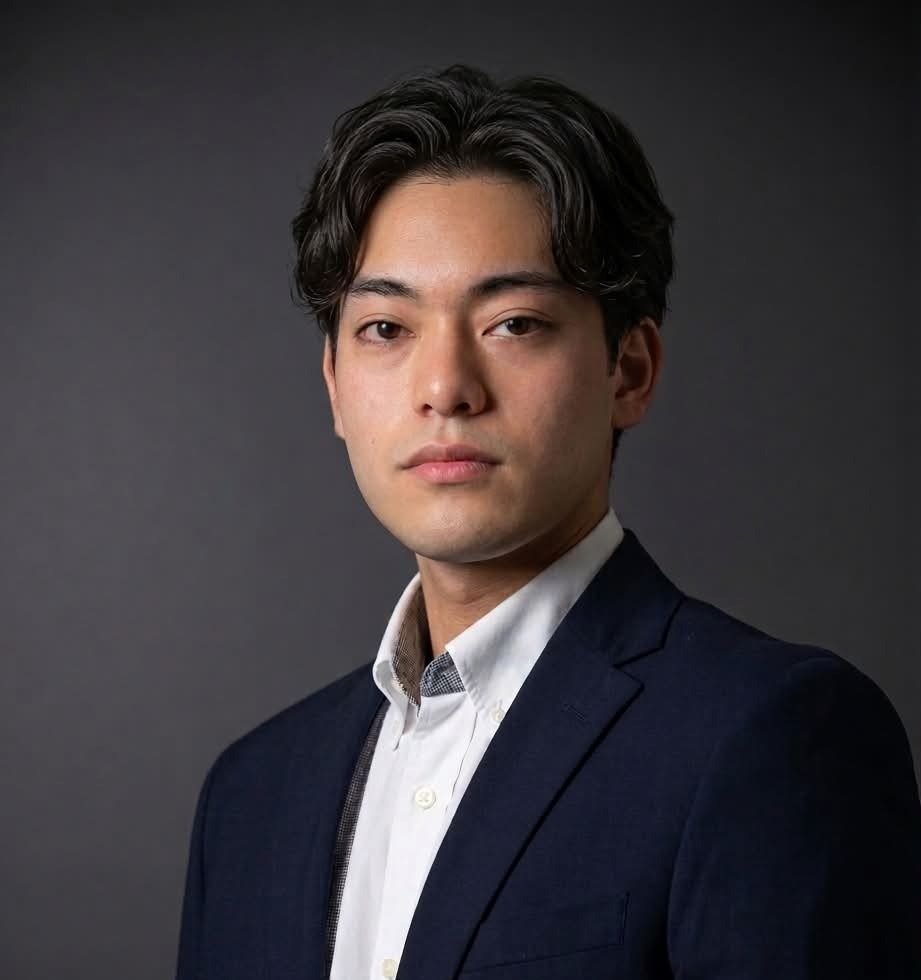
Jakob Edhel Puri grew up in the Philippines taking apart electronics and tinkering with computers. Whenever a task on a screen felt clunky, his first instinct was to build a faster way around it. Today he studies engineering, from communications and electronics to advanced mathematics, and builds Mac apps.
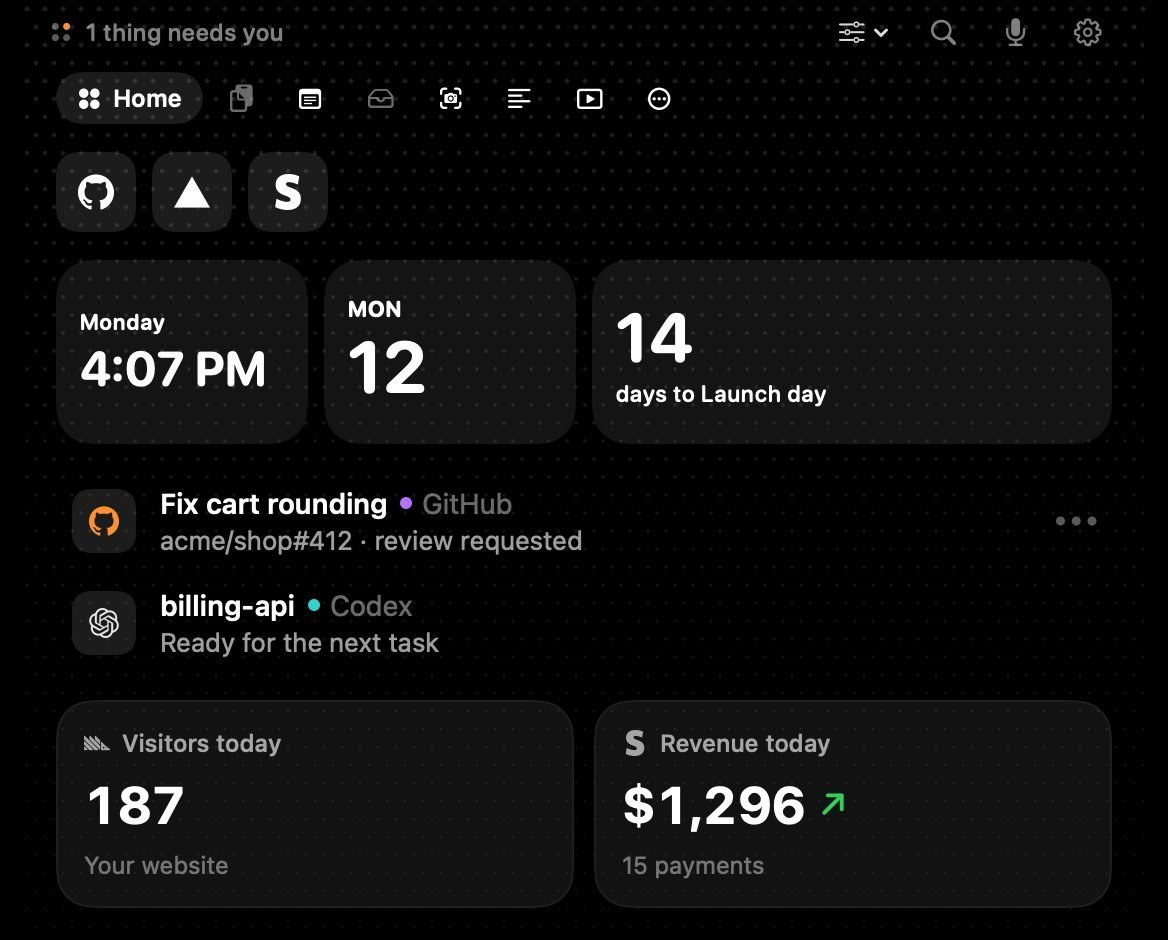
Dots started at his own desk. Studying and coding on a MacBook, he kept switching between his code editor, a browser, YouTube lectures and screenshot tools, and lost his focus every time. Then he looked up at the notch, sitting in the middle of his screen doing almost nothing, and turned it into a workspace: launchers, a video player you can pop out, scrolling screenshots, a teleprompter under the camera and local file sharing, with a $5 one-time Pro instead of a subscription. We spoke about building and selling Mac apps from the Philippines, what he leaves out on purpose, and why he cares about local-first software.
Key takeaways
- Dots turns the MacBook notch into a workspace you reach by moving the cursor up. On Macs without a notch and on external displays it anchors to the top-centre edge, so the habit stays the same.
- Tools come out of the notch: detach a video player, resize it anywhere on screen and snap it back without stopping playback.
- Everything runs locally. There are no mandatory accounts, file conversion happens on the Mac, and Send nearby moves files without a third-party server.
- Dots is free to use, Pro is a $5 one-time licence, and around 100 to 300 people use it today.
Before any of this
Startup.talk:Where did you grow up, and what was childhood like?
Puri:I grew up in the Philippines, in an environment where curiosity was always the best entertainment. Growing up, I was naturally drawn to how things worked under the hood—whether that meant taking apart electronics, tinkering with computers, or figuring out how to solve problems with whatever tools were available. It taught me early on to be resourceful and self-reliant.
Startup.talk:What first got you into building things?
Puri:A mix of impatience and curiosity. Whenever I hit a repetitive task or a clunky workflow on a computer, my first instinct wasn't to accept it—it was to figure out if I could script or build a faster way around it. That habit eventually turned into a passion for software engineering, electronics, and building tools from scratch.
Startup.talk:What was your first job, and what did it teach you?
Puri:My earliest professional work involved taking on short, high-intensity software engineering sprints—turning rough prototypes into production-ready applications and integrating local AI workflows. It taught me two critical lessons: speed matters, and shipping something reliable that actually solves a user's bottleneck is infinitely more valuable than over-engineering in isolation.
The road to Dots
Startup.talk:What do you do besides building apps, and how did you start?
Puri:Outside of indie app development, I study engineering—diving into everything from communications and electronics to advanced mathematics—and I build local DevOps and observability tools. I started building apps simply because I wanted better tools for my own daily workflow as a student and developer.
Startup.talk:You describe yourself as building apps with AI. How does that change how you work?
Puri:Working with AI compresses the distance between an idea and a working prototype. Instead of spending days boilerplate-coding or getting stuck on unfamiliar native APIs, I can iterate on architecture, test edge cases, and refine UI interactions in hours. It lets a solo builder operate with the output of a small studio—while keeping full control over local, privacy-respecting code.
Startup.talk:What was the moment you decided the notch deserved more than a camera?
Puri:I was studying and coding on my MacBook, constantly Command-Tabbing between my IDE, a browser for research, YouTube lectures, and screenshot tools. Every time I switched windows, I lost my flow state. I looked up at the top of my screen and realized the notch was sitting right in the center of my visual field doing nothing—while most notch apps only used it for basic music controls. That was the moment I decided to turn it into a real workspace.
Startup.talk:What did the first working version do, and who used it first?
Puri:The earliest version was a lightweight top-center shelf that let me pin quick tools and switch contexts without stealing focus from my active window. I was the first daily user, followed closely by university classmates and groupmates who needed a faster way to juggle research, lectures, and screen captures during crunch time.
Startup.talk:What is it like to build and sell Mac apps from the Philippines?
Puri:It’s a superpower with a few unique hurdles. Building from the Philippines gives you global leverage—you can build world-class software from your bedroom and sell it to users in the US, Europe, and Asia. The challenge is navigating international payment processors, tax compliance, and timezone gaps for launches, while realizing that marketing and distribution are often twice as hard as writing the code.
“you can build world-class software from your bedroom and sell it to users in the US, Europe, and Asia”Jakob Edhel Puri
The product
Startup.talk:Why the name Dots?
Puri:"Dots" represents small, understated focal points that connect your entire workflow together. A dot is minimal, unobtrusive, and takes up almost no space—yet when you connect them, you get a complete picture. It fits an app that lives quietly at the top edge of your screen until you need it.
Startup.talk:Why the notch as the home for a workspace?
Puri:Because your eyes naturally rest near the top third of the screen, and the notch is hardware real estate you already have. Putting a workspace there means you don't have to clutter your desktop with floating widgets or lose your place by switching full-screen spaces. You just glide your cursor up, grab what you need, and drop right back into your work.
Startup.talk:Why a teleprompter under the camera?
Puri:When you're recording a product demo, a class presentation, or a video update, looking down at notes on your screen makes it obvious you're reading. Placing a teleprompter directly beneath the camera lets you speak naturally while maintaining eye contact with the lens.
Startup.talk:Why scrolling screenshots and a citation converter?
Puri:Those came directly from real friction in studying and building. When you're researching papers, documenting code, or capturing long threads, stitching screenshots manually or reformatting citations breaks your momentum. Having scrolling capture and instant format/citation conversion built right into the notch turns a 5-minute interruption into a 3-second action.
Startup.talk:Why local file sharing with Send nearby?
Puri:Because emailing files to yourself or uploading sensitive documents to a cloud drive just to move them across the room is absurd. Local peer-to-peer sharing keeps transfers instant, works offline, and ensures your files never touch a third-party server.
Startup.talk:Why a $5 one time Pro rather than a subscription?
Puri:People are exhausted by subscription fatigue—especially for utilities. A utility should feel like a trusty tool you buy once and own forever. Keeping a generous free tier and pricing Pro at a $5 one-time license removes all friction for someone trying it out while building genuine goodwill.
“A utility should feel like a trusty tool you buy once and own forever.”Jakob Edhel Puri
Startup.talk:Why mic auto mute after silence?
Puri:It's a small safety net for screen recordings. If you're recording a long walkthrough or study session and step away or pause to think, auto-muting Dots' recording mic after 30, 60, or 120 seconds of silence prevents awkward background noise without touching your actual meeting apps.
Startup.talk:What do you deliberately leave out of Dots?
Puri:Cloud bloat, mandatory accounts, heavy background telemetry, and gimmicky animations. Everything in Dots is designed to run natively, stay lightweight on system resources, and keep your data local on your Mac.
Positioning
Startup.talk:Who is Dots for, and what job does it do for them? Describe the person who gets the most value.
Puri:Dots is built for students, developers, and creators who live inside deep-focus windows—like an IDE, a Figma canvas, or a research paper—and hate losing their train of thought to window management. The person who gets the most value is someone who juggles multiple mediums at once: watching a lecture or tutorial while coding, taking quick annotated captures, running Pomodoro sprints, and firing off custom shortcuts without ever leaving their primary workspace.
Startup.talk:How do you view your positioning relative to Alfred, NotchSpace and OmniNotch? Is there another competitor you think of first?
Puri:Alfred is a keyboard-driven launcher; it's incredible, but it's transient—it disappears the moment you execute a command. Most notch utilities like NotchSpace or OmniNotch focus heavily on media playback, aesthetics, or simple file shelves. Dots is positioned as an active, persistent micro-workspace. You can keep a video playing, run a timer, annotate a live screen, convert files, and trigger developer workflows all from one unified hub.
Startup.talk:What is your core moat in a crowded space of notch apps?
Puri:Anyone can wrap a media player around the notch in a weekend, but building a cohesive suite—detached picture-in-picture video, scrolling capture, screen drawing, local conversion, SSH/dev tools, and a teleprompter—that feels native and fast is much harder to replicate.
Startup.talk:What are some of the use cases for Dots that are not obvious and can add a lot of value to users? List as many as possible.
Puri:Picture-in-picture lecture & coding mode: Dragging a YouTube tutorial onto the notch, detaching it to resize while coding, and snapping it back into the notch without restarting playback.
Live meeting whiteboard: Dragging the Draw tool out of the Capture pane during a screen-share to sketch arrows and highlight UI bugs directly over any app.
Zero-cloud file conversion: Dropping images, audio, or video onto the notch to locally convert them (e.g., to PDF, PNG, M4A, or MP4) without uploading private files to random web converters.
Remote server triggers: Running quick SSH services, agent checks, or developer scripts straight from the top edge of the screen without opening a terminal window.
Camera-level script reading: Using the built-in teleprompter for Loom updates or asynchronous standups so your eyes stay locked on the camera.
Startup.talk:What is the one detail in Dots you are proudest of?
Puri:How you can detach a video player or tool from the notch, resize and move it anywhere on your screen, and return it back into the notch without losing state or interrupting playback. It makes the notch feel alive rather than rigid.
Launch
Startup.talk:What did you learn from the launch?
Puri:Launching on Product Hunt in October and November 2026 taught me that building the product is only half the battle—distribution is a completely different discipline. Launch day spikes are great for validation, with days hitting over 50 downloads, but sustainable growth comes from talking directly to users in niche communities where people are actively complaining about the exact friction you solve.
Startup.talk:Which feedback from the launch surprised you?
Puri:How many people without a notched MacBook—or people using external monitors—still wanted to use Dots. That pushed me to make sure the experience worked seamlessly on non-notched displays and external monitors, turning it from a "notch gimmick" into a universal top-edge workspace.
The hard part
Startup.talk:How many people use Dots today?
Puri:Right now, we’re in our early growth stage with around 100 to 300 users, and we're seeing steady, organic adoption as more people discover it.
Startup.talk:What is a challenging time you had building Dots?
Puri:Balancing deep technical polish with the grind of marketing while juggling university engineering coursework. There were moments where fixing subtle macOS window-level bugs across multi-monitor setups took days of trial and error, followed immediately by the realization that nobody knows your app exists unless you actively put it in front of them.
Startup.talk:Who believed in you before there was anything to show? What did they say or do?
Puri:My close peers and classmates. Even when Dots was just a rough prototype running locally on my MacBook, they tested early builds, gave honest feedback on what felt clunky, and encouraged me to ship it publicly instead of keeping it as a personal tool.
Startup.talk:How do you design for Macs with and without a notch?
Puri:By treating the notch as an anchor point rather than a hard dependency. On notched MacBooks, Dots hugs the hardware cutout seamlessly; on non-notched Macs and external displays, it anchors cleanly to the top-center edge of the menu bar so the gesture and muscle memory remain identical everywhere.
What it is all for
Startup.talk:What would make you say Dots has succeeded?
Puri:When Dots becomes one of the first three apps a Mac user installs on a brand-new machine—not because it's flashy, but because working without it feels noticeably slower.
“When Dots becomes one of the first three apps a Mac user installs on a brand-new machine”Jakob Edhel Puri
Startup.talk:What does a day look like when your whole workspace sits at the top of the screen?
Puri:Your desktop stays completely clean. You open your main work window full-screen, start a Pomodoro timer in the notch, keep a reference video or documentation tucked at the top edge, snap and annotate screenshots on the fly, and share files locally—all without ever breaking your visual focus.
The road ahead
Startup.talk:What are your hopes and fears for a post AGI world?
Puri:My hope is that superintelligent tools democratize creation completely—allowing a single person anywhere in the world to build, cure, and invent things that used to require massive institutions. My fear is that we trade away human agency, privacy, and craftsmanship, letting centralized cloud systems own all our data and thinking for us. That's why I care so much about local-first software and tools that augment human focus rather than replacing human intent.
“tools that augment human focus rather than replacing human intent”Jakob Edhel Puri
This interview was conducted in writing and has been edited lightly for length and clarity.
About Dots
Dots is a customizable workspace built into the Mac’s notch, with launchers, web spaces, shortcuts, media controls, notes, a Pomodoro timer and file tools. It works on Macs with and without a notch. Free to use; Pro is a $5 one-time licence for one Mac. dotsapp.cloudaeri.com
For founders
Building something? Want to share your journey?
Tell us how it started, what nearly broke it and where it is headed. We will turn it into a story like this one.
Share your journeyFor readers
Want to read more human stories behind the startups?
New founder interviews and stories, as they are published.
Follow us on LinkedIn